Showing posts with label abaqus. Show all posts

Monday, March 14, 2011

The Life of a Contract Engineer: Week 7

Seven weeks! It is still surreal that I have the opportunity to go to work and get paid for doing something that I enjoy. I spent the majority of my week learning how to use HyperMesh, which is part of the HyperWorks finite element suite. This is the third finite element software that I have learned. First it took me a year (working part time) to understand Abaqus and DANTE, then it took me a month to understand ANSYS and in less than a week using HyperMesh I have made significant progress. I now feel more valuable as a finite element engineer than I ever did in graduate school. I just need CATIA and NASTRAN to round out my repertoire and I'll be more qualified than most of the tech support for all of those companies.

Secondly at work, I enjoy the people I work with. I think that is an important factor. I have never really been in a bad working situation, but I can imagine and I have heard stories. Even five minutes of socializing with my coworkers per day is a nice mental boost.

My running injury just took a ginormous (that is an actual word!) leap forward! I went to a massage therapist and had fingers and thumbs pressed into my knots to the point that I was in significant pain and the knots started to release. I continued to do my exercises and I even bought a foam roller so that I could work on rolling out my tight muscles. In total I ran about 77 miles including a 3.3 mile tempo at 5:54 pace and a 12 mile and 10 mile run at 6:55 and 6:50 pace respectively. Those are three very pleasing runs compared to the amount of pain that I was in for two weeks.
Foam Roller
In other news I started an account with mint.com at the recommendation of a friend who is traveling in Laos right now. It is pretty cool. It updates all of my account information every time that I log in so that I can see how my net worth or paying off my loans is going. I am worth negative tens of thousands of dollars. That's old news, but it's nice to see it change for the less negative. For me simply seeing the numbers helps me make the numbers a little less terrible to look at by applying money where it makes the most difference.

Additionally relating to money, I've done some reading about history and it is not that hard to make substantial profits in the stock market. From a mathematical point of view there are a number of quarterly published variables which indicate that certain stocks are worth more than the price that you have to pay for them. It's not physics, so you will not get the same reaction every time. However, it is statistics, and if you play the numbers in enough quantity for long enough, according to the history of the stock market, you will make money. I'll write more on that in the future.

I hit a deer with my van. It has a huge dent in it and I would take a picture except that it's dark out right now. I'll do a post about the six accidents I have had in the last nine years.

Finally, in news relating to the book I am writing, I passed 48,000 words and 100 pages this week. That's 100 pages of single spaced writing with only four pictures and four pages of contents and title stuff. I am very excited about how well that is going. Although, I don't have an agent, much less a publisher, and I have not done any speaking engagements yet. So I have a long way to go, but I feel I am on the right path. My goal is to have a rough draft finished in the next few weeks. I do not have too much more left to add. I am sure that things that I have written thus far could be a huge help to others in their early 20s tackling unemployment, underemployment and misemployment.

Oh and one more note along the investing lines, about a year ago I solicited investors for Janzen Gear. I had a few bites but did not reel in the kind of investor that I was looking for. I am thankful that I did not find an investor at that point in my life. I learned a lot about product costs and failure. The hangboards are a much better situation. I am able to fund the costs out of my own pocket, and thus will put all the profits back into my pocket, or rather into manufacturing more. This product has a much greater ability to generate profits from batch one (ten hangboards). The ice axe would require huge batches (hundreds and ideally thousands) and even lower profit margins (although not much lower) and required safety testing. I just did not understand all of those challenges a year ago, yet it makes a huge difference in business. Also, running this as my second job allows me to think small. I am not relying on Janzen Gear to pay my bills. It allows me to deal in smaller volumes with lower profits than the big boys. Which means a high value product for the price and the prestige of limited quantities.

Thursday, December 9, 2010

I am Awesome!

Sometimes I have to tell myself that to avoid depressing thoughts. Specifically, applying for jobs! Finding a job has to be the worst job there is.

One of the things that I started doing a few months ago was attaching a sample of my work. People can say anything, but can you show what you do? You want to actually know what I can do? Well look at this:

An Abaqus finite element simulation frame taken 10 seconds into the quenching operation during the heat treating process of a transmission ring gear made of Pyrowear 53 showing the percent austenite in the steel.

I have close ups and other examples if necessary.

Wednesday, November 10, 2010

Do I Start to Lie?

I am a terrible lier. Ask anyone. A typical lie will manifest itself about once every two months humorously around my friends which will be followed by myself saying ten seconds later, "I'm sorry. That was a lie..." just incase they did not get the joke and I will explain the truth.

I was taking a true and false quiz for a position at an aerospace company. I was applying for an engineering job. The position was a statics load engineer. One of the questions was, "Do you have a masters degree in Aeronautical or Aerospace Engineering?" I answered "False" because of course I do not have that degree. I have a masters in Materials Science and Engineering. As I stared at the job title and the question I thought, 'Really? A master's in Aeronautical or Aerospace Engineering would know something about static loads that I don't?'

This is not nearly the first question that I have answered "wrong". I often answer questions about specific programs that I have used. Many aerospace companies use CATIA, a CAD and FEA software package. I have not used CATIA but I have used SolidWorks, ProEngineer, AutoCAD and Abaqus as well as creating MatLab simulations. How hard would it be for me learn CATIA? I am 99% confident that in less that one business day I could create a beam and bend it in a finite element simulation. Sure that is very simple to an experienced user, but considering I have never touched the software that would be impressive. I have spent so much time learning different CAD programs and a fair amount of time learning FEA that switching to a new system would be measured in hours or days instead of weeks and months and even years for a true beginner.

So when I am asked how much experience I have with CATIA and I answer "none" I can feel the recruiter passing my application into the junk pile. Interestingly enough CATIA and SIMULIA (the company that produces Abaqus) are owned by the same company. Lest one of my readers think that my education was lacking I would not change a thing. Abaqus supports DANTE which is a very powerful piece of software for heat treating steels and something that CATIA does not do, as far as I know. CATIA can model kinetics, however, I am not sure to what extent it covers. Steel, particularly the Pyrowear 53 I was working with, has fairly complex heat treating kinetics compared to most things.

Wow, that got detailed.

Anyway, I'm not going to lie. I can't. Also, it doesn't make sense. Despite the fact that I could probably pass myself off as knowing CATIA (let's be honest, companies don't actually test your technical skills until you start working; they only ask questions about your technical skills) however, truthfully I don't know CATIA.

Frustrating to say the least. It's like asking if I drive a Ferrari. Well, I've never driven a Ferrari. Does a Porsche count? No. Once again I wonder, do nice guys finish last?

Actually, finishing last would be fine with me. At this point it would be nice to know that I even get to start the race.

Tuesday, October 27, 2009

A first fruition of my work!

I'm working on this complex model of half of a ring gear. I've been working on it for several weeks, probably more like months. The last two weeks I've been working on associating the mesh with the geometry which is a problem with bottom-up meshing sometimes. In short, the mesh made up of a finite number of elements is not the same as the geometry that you planned. They may look the same but when you take a closer look you will see slightly off angles in the range of .1 or .2 degrees away from parallel. There are also curves that are approximated as strait lines that you need to associate with the geometry. So you must select Mesh > Associate Mesh with Geometry..., then select the feature (face, edge, etc. ) on the geometry, then select the mesh (using "by angle" instead of "individual" works better but keep the degrees like .3 or something low) then click done and the face or other feature you selected on the mesh is now associated with the geometry.

So I just finished associating the mesh with the geometry on my 400 faces or so and Abaqus successfully wrote out the input file (which I still have to edit so that if actually runs)! The point is I am hours (perhaps days) away from a truly fantastic carburizing simulation!

Tuesday, September 29, 2009

Stress!

The finite element stress simulations I create using Abaqus often have very interesting stress fields. The interesting thing about stress is that it is not just a number. It is several vectors, in fact it is actually a tensor. So this is way cooler than temperature because you can't just specify that those nodes are at a certain stress level. So that you can see here is the stress at element 1 in one of my simulations (all numbers are in MegaPascals):

Element: 1 Von Mises: 2.91804 Maximum In-plane: -153.946E-03 Minimum In-Plane: -2.99197 Out of Plane: 0. Maximum Principle: 0. Mid-Principle: -153.946E-03 Minimum Principle: -2.99197 Tresca: 2.99197 Pressure: 1.04864 Third Invariant: -2.90889 S11: -205.309E-03 S22: -2.94061 S33: 0. S12: -378.328E-03

Monday, September 21, 2009

Making Assumptions (in Abaqus)

At the conference I attended last week I was able to talked to the creators and owners of DANTE. It is a material database with kinetic phase transformation information that interfaces with Abaqus. What that means is that when Austenite transforms to Martensite and there is a volume change you can simulate that. (It is a really big thing in the heat treating world because only two companies have created software to do that.)

I talked to them about my specific problems and learned that they make many simplifications such as only using one or two heat transfer coefficients in each step on complex parts and simulating the interactions between parts by simplifying the geometry of the parts. I know those are two vague descriptions but I really should not delve into the details. The point is that they just made my job a lot easier. It is amazing how much a 10 minute conversation in person can be so much more informative than an email conversation or trying to read technical papers looking for the answer.

The moral of the story is: perhaps you can find the solution to your problem by simplifying the problem. Of course sometime it can not be simplified...

Thursday, September 10, 2009

Abaqus: How to Reduce the Size of your .stt file

Often .stt files can be larger than the .odb files. When you have a limited storage space it becomes important to try and reduce the size of your files. The way to do this is simple: increase the output frequency. This means that instead of writing the resulting data in every single time step to the .stt file only 1/5 or 1/20 or 1/1000 of the step data is written to the .stt file. I think this also makes the simulation run faster but I can not be sure. To reduce the frequency either specify when creating the output requests in Abaqus CAE or edit the input (.inp) file. Here is an example of how to reduce your output requests by editing the input file:

** OUTPUT REQUESTS
**
*Restart, write, frequency=25
**
** FIELD OUTPUT: F-Output-1
**
*Output, field, frequency=25
*Node Output
NT,
*Element Output, directions=YES
SDV,
*Output, history, frequency=25

The frequency could be reduced more or less until you are able to see the information you desire and have a reasonably sized .stt file. A higher frequency means fewer steps are output and your .stt file will be smaller. Also it is important to note that when viewing the time history results of a simulation that the beginning and end of every step will be show. That means that for a step that is ten seconds long you will be able to view the results of the simulation at 0.0 seconds and 10.0. That holds even if the output frequency is 1000.

Friday, August 21, 2009

Abaqus: How to Know if your Simulation is Running

As soon as you start a simulation you spend time waiting for it to finish. However, it is not obvious from Terminal (the program I use on my Mac) if the simulation is running or has stopped or ended. All you need to do is check the files in the folder or directory where you started your simulation. I use a simple program called Cyberduck. It is a file management system that allows me to navigate the servers I use (which are two buildings away) as well as download and delete files.

Now when a simulation is running in Abaqus 6.7 the files that will appear have the extensions: .stt, .msg, .odb, .sta, .res, .dat, .mdl, .log, .lck, .023, .prt, .cid, .com, .inp, and sometimes .fil depending on the simulation. The file name will be the same for all the extensions. When the simulation is over the .lck, .cid, and .023 files will disappear. That's all there is to it. Either you have those three files or you don't.

Tuesday, August 18, 2009

Asking the Right People the Wrong Questions

I've been struggling with an Abaqus problem recently and I asked one of the true experts of the field a question directed to what I thought the problem might be. He then answered my question with the answer to the question that I should be asking. I was totally looking in the wrong place.

I've said many times that I surround myself with great people and just draw off of them. This is another example where someone was able to answer my question, even though I wasn't really asking it. For someone that really knows their stuff it doesn't take much for him or her to understand your problem.

Find the right people in your life.

Tuesday, April 28, 2009

Abaqus: Create Animations

So you spend half an hour loading Abaqus and getting it started to watch the movie of the simulation you ran last night and it was a good simulation so you need to make a movie so you can show your boss or professor or whoever. Here is how to make an .avi, Quicktime, or VRML movie. 
1. Select the Visualization module if it isn't already selected. 
2. Select the Result drop down menu and select the desired result to view. In this example I selected Field History > NT11.
3. Select Animate > Time History ( you can select other options but this is what is most commonly used)


4. Select Animate > Save As...
5. Complete the Save Image Animation box. Be sure to make a unique name and select the file type that you want (.mov in this example because I've had lots of problems with .avi files). Select the Capture: Current Viewport or All Viewports option if you have multiple viewports. You can select the Capture Viewport Decorations and Capture Viewport Compass so that each frame has more information and you can tell what step you are in at any given time. Finally select a very low frames per second rate. I usually do one or two frames per minute because I spend hours working on a simulation that I want other people to watch it for 30 seconds and not 3 seconds. This of course depends on your output rate but for any simulation with many steps your output rate will be low to conserve gigabites so make
 your frames go slowly. An art major once told me that it takes at least 15 seconds of looking at a picture to take in what is happening. 

6. Watch your movie!
video

Thursday, April 23, 2009

Easy Finite Element Modeling

It doesn't exist. For anyone that thinks that setting up a computer simulation is something to do in an hour and then let it run for four hours and look at the pretty pictures you are misinformed. I spent five hours this morning running Jominy end quench blocks in Abaqus using different quenching recipes. It is one thing to create a part or a mesh or several steps or interactions but getting them all to work together and give you the same results that hundreds of scientific papers have proven is a little more challenging. If your elastic modulus is off by one order of magnitude because you missed a centimeter to millimeter conversion it could take you hours to figure out why the wing doesn't flex. 

Modeling isn't easy or fast. Although, I can run a Jominy end quench test in only two minutes after changing the heat transfer coefficients compared to the three hours of actual time to complete a test in real life. 

While my blog has no theme except the challenges I face or stories from my life as a 22 year old in 2009, I post about Abaqus because I spent hundreds of hours figuring things out the hard way so if I can give people a few tips and save them ten hours this world just may be a better place.

Wednesday, April 22, 2009

Abaqus: Modules

I started to get a few hits of people looking for basic Abaqus information so I'm going to post several posts about the basics. First, Modules. There are ten modules in Abaqus (version 6.7 at least): Part, Property, Assembly, Step, Interaction, Load, Mesh, Job, Visualization, and Sketch. It is important to be in the right module when you do certain things like when you use the Tools drop down menu. Below you can see where the module drop down menu is so that you can change the module as needed.


A short description of each module:
  • Part: Used to create the geometry of the part. It is basically a simple CAD tool. You can import more complicated models from ProE and Solidworks from File > Import > Part.
  • Property: Used to create the material properties that you will use in the simulation. Be sure to create a section (with your material) and assign the section to the part.
  • Assembly: Used to instance the part meaning if you have several parts you can put them in the same assembly but if you have one part it still has to be in an assembly. You can then either mesh on the part or the assembly.
  • Step: Create the simulation steps required for your simulation. 
  • Interaction: Used to create interactions between parts or between a property and a part. I use this in heat treating to describe the property of the heating and quenching fluids. 
  • Load: Used to create loads, boundary conditions, and predefined fields (like initial temperature).
  • Mesh: This module is for creating finite element meshes.
  • Job: Simply go to Job > Create then (I prefer to go to) Job > Write Input and then you can do the rest of the editing using kwrite and going through the input file (.inp file). 
  • Visualization: Used after your analysis to see distortion and whatever else you are looking for.
  • Sketch: It is like the Part module but for sketching. I don't use it.
Leave a comment if there is something specific you want me to write about.

Tuesday, April 21, 2009

Abaqus: Deciphering .dat files

Understanding .dat files is the first step to understanding why your simulation didn't work. First you will know the simulation didn't work because there is an .0db_f file or you look at the .odb file and the simulation ends before it gets to the end of the last time step. Second open the .dat file and scroll to the bottom and it will tell you the total number of errors. Just because it says you have 15 errors doesn't mean you have 15 problems. Most of the time one error in the program will show up multiple times. Third scroll through the .dat file finding where it lists the errors and try to correct them with the .inp file open at the same time. Use kwrite instead of kedit to view and edit multiple large files at one time. In case of a very large file you might have to open it with a text editor.

For example if you define the element type to be C3D8 instead of DC3D8 for a heat transfer analysis you will end up with perhaps eight errors on the .dat file. Often the problems are created by editing the input file and not copying and pasting the correct value. 

For example if you want to apply a load to PickedSet12 in one of the steps be careful to make sure if is _PickedSet12 or just PickedSet12 by looking into the Assembly section and noting the number of underscores that precede the set name. If there are two underscores in the Assembly section then you need one underscore in the Step section. Similarly one underscore in Assembly means no underscore in Step. It is important to make sure that what you reference in each step is the same thing that the program reads  from the Assembly information. 

Another common problem can be not defining hourglass stiffness. Solve that problem by deleting an R at the end of the element type. For example C3D8R becomes C3D8.

Friday, April 17, 2009

Abaqus: Selecting Inside Surfaces

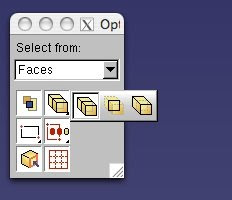
If you need to select an interior plane or surface but you are having trouble there is a way. First select the options button on the bottom of the screen between the drop-down box for how you select surfaces and the Done button. 

Second, select the surface type box within the Options box. The left option is all surfaces possible, the middle box is only interior surfaces, and the right box is exterior surfaces.

Thursday, April 9, 2009

Abaqus: Bottom-up mesh example

So swept meshing and structured meshing have failed or aren't available but bottom-up meshing is complicated and hard right? Not as much as you might think. Here is a sample of how I meshed a region of a part using bottom-up meshing technique. This is using Abaqus version 6.7 and I'm skipping the parts about seeding, partitioning, and element type that you have to do to make a mesh. Be sure you seed the region before you mesh it or it will not mesh.

Step 1: Select Mesh > Controls... > Hex (in this case it could be something else but hex looks the most professional) > Bottom-up. Then you select the region (partition, cell) of the part you wish to mesh with bottom-up technique.


Step 2: Click on Mesh > Create Bottom-Up Mesh... Then select the cell (region, partition) that you just gave mesh controls to. The "Create Bottom-Up Mesh" box will appear.

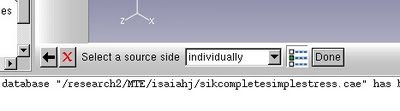
Step 3: Select the Source side. Click "Done" when you have selected the source side. This is the side where the mesh will be created in two dimensions, essentially the bottom of the part, so that the mesh can be swept through the volume.
Step 4: Then select at least one connecting side in this example I choose five connecting sides. The more sides you have the more structured the mesh will be. When you have selected the side(s) click "Done". In some cases you have have to specify a Target side but in general is is not necessary.

Step 5: Click "Apply" in the "Create Bottom-Up Mesh" box and you are done! So that you know the details this mesh had 2304 elements, with 0 analysis errors and 48 analysis warnings. (That means it's pretty good.)

If you have any questions just ask.

If I helped you solve your problem consider how cheap my consulting services are and help me pay the rent:


Monday, April 6, 2009

Abaqus: loads

When selecting surfaces for loads it is possible to select multiple surfaces at once by selecting the "by angle" option on the drop down list at the bottom of the screen.  At the bottom of the screen it says: Select surfaces for the load (drop down box). First select the by angle option and then an angle (default is 20 degrees). Then select a surface and all adjoining surfaces within 20 degrees of the plane you chose will be selected. When you have a slow computer or internet connection this really helps speed things up. 

When specifying fluxes be sure that the flux you specify is in the correct units (like kg/mm^2/s for a surface flux instead of something like g/cm^2/s). Units in Abaqus can drive people crazy because Abaqus doesn't care if the numbers are logical or not.

Wednesday, March 18, 2009

Abaqus, Bodycote, Alpinist, Legalzoom

Today was fairly progressive. I spent most of the day working on an Abaqus problem with the mesh not agreeing with the geometry which is a result of my partitioning and the following meshing. The problem was/is hard enough that the resident post-doc simulation master couldn't solve it, or at least he didn't spend the time to really figure it out. Abaqus: 1284 Isaiah: 63

Tonight at the ASM Worcester meeting Roger Fabian the president of ASM International gave a talk about the future of materials engineering and reasons to join materials societies. He ended up talking at least five minutes about the aerospace industry. Eclipse went out of business and sold itself to EclipseJet. Boeing isn't doing to hot. The jets up in Canada aren't going crazy. The A380 is still being made. The point he made was that he expects the aerospace industry to turn around the end of this year. Business jets on the other hand he expects to not make a full recovery until 2012. (For the few of you that I have spilled my dreams to you know that this is actually good news!)

This afternoon I read a blurb that Alpinist Magazine is coming back with almost the same quality that it used to have before it was canceled in October. So I decided that instead of complain about it's demise I would buy a subscription to do my part to prevent that from happening again. The nice part is that for first time members the price is only 34 per year instead of 46. 

My marketing director for my mountaineering gear company told me about legalzoom.com today and I just checked it out for a few minutes. I'm thinking that I will have some free time in May and then I can form a LLC or incorporate. Have a friend build a website this spring or summer while I'm away. Then when I get back in August start selling/building. I've read that often people sell products before it exists (think houses, contractors, fast food, guiding/cruises). So the thing to do would be outsource all of the stuff to be built in May and early June so that it would be on my door step by August and then I could proceed to get UIAA certification and other testing done while someone builds batch two of this and the website starts selling these things. 

Monday, March 16, 2009

Abaqus Meshing

So the past week has seen me start from scratch meshing my gear in Abaqus. We decided to cut the tooth in half so that there would be less computing power needed and we could apply a symmetric boundary condition so that we could replicate an entire tooth. So after hours of very annoyingly finding error and more errors in the mesh I finally meshed the whole thing with no errors! I had to use several different techniques such as partitioning the part into five separate cells which was not trivial because if any cell had too obtuse or too acute angles the resulting elements would results in errors. I started by meshing the cell at the root of the tooth. I then had to partition some of the faces around the root of the tooth because trying to mesh that area as a swept hex mesh was giving distorted element shapes but after some simple partitioning the elements came out more uniform. I then meshed the area behind the root of the tooth using a bottom up hex mesh which only today have I mastered. Then I meshed the flank of the tooth using a swept hex mesh. Then I meshed the top land and core of the tooth using bottom up hex meshing again. Finally I meshed the flange of the gear using a swept hex mesh on a single cell so that is why there are some non-uniform shapes but it gave me no error or even warnings so I'm quite content to leave that as it is. 

Here take a look!